Using Monklets

by Etienne de Bruin, Chad Johnson | Last edited: 3/24/2008

What is a Monklet?

A Monklet is a macro-like block of code which can be called from a page to return dynamic web-based content. A Monklet consists of a set of parameters which determine what content is shown.

If, for example, you wanted to display a list of Blogs on your site with links to each, you could create the following Monklet:


tag="blog"
display="list"
groupby="category"
"show_postlist:<h3><a href="__blogtitlelink__">__blogposttitle__</a></h3>"

To call this Monklet on a page, your page content would reference the Monklet name, surrounded by curly brackets, as follows (assuming your Monklet was named "Blog List":

<h2>Select a blog:</h2>

Passing inline parameters to Monklets

When calling a Monklet on a page, you can optionally pass parameters to that Monklet. This allows you to use that same Monklet in different contexts, producing varying output, rather than writing multiple Monklets to do almost the same thing.

If you pass a parameter to a Monklet, and that parameter already exists in the Monklet, the value for the pre-existing parameter in the Monklet will be replaced with the value you specify.

Suppose you wanted to display a list of blogs on your site using the example Monklet mentioned earlier, but then suppose you wanted to group by something other than category--for instance, by author. You could override the default groupby setting by attaching a parameter to the Monklet call in your page content, as follows:

The list of accepted parameters is as follows (* denotes a wildcard):

  • find*
  • group*

    Calling Monklets

    There are a couple ways to access Monklets

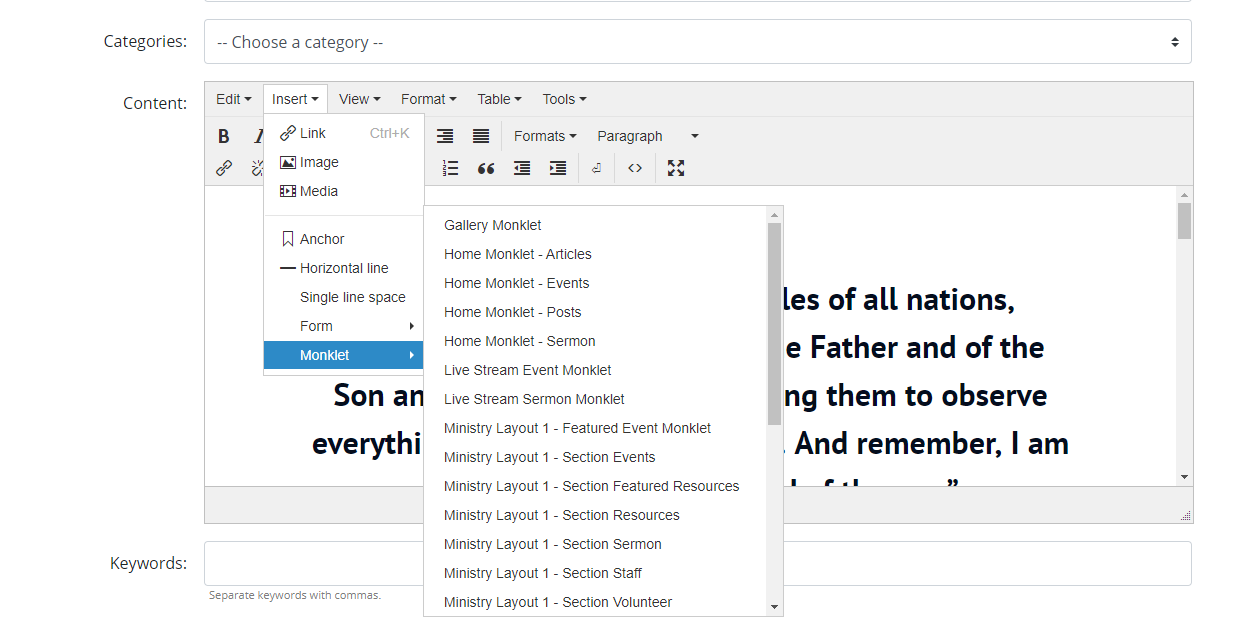
    • From within any content area in the CMS:
    • From within any template file on the client website: getContent("monklet-slug")